One laptop, a lot of agents

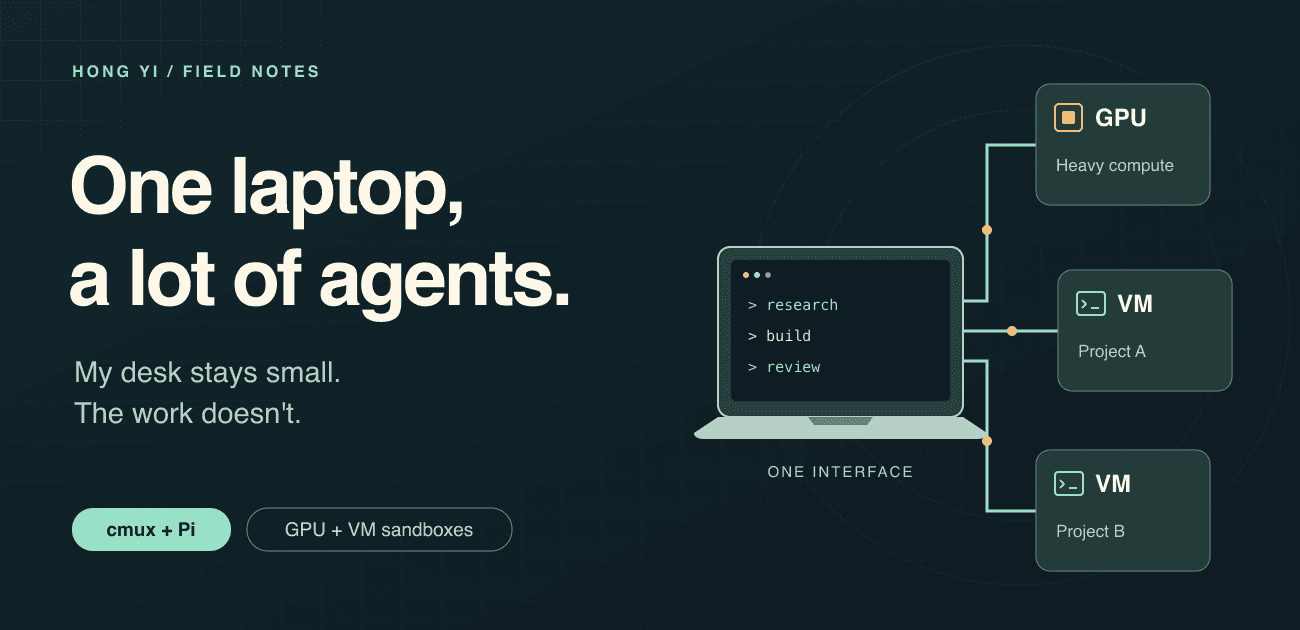
I like working from my Mac. I don't want every job to run on it. (I only have 18GB ram😩)
Some work needs a GPU. Some needs a clean Linux environment. some agents are long running and need their own env. Moving between Framed, defense-tech work, and personal projects, I want to parallelize.
At the same time, I don't want to spend all my time managing 15 TMUX sessions.
So I've been building a setup where I unify all my agent surfaces, accessing each with CMUX. This is distributed across my mac, Linuxbox(GPU), proxmox(minisforum X470 pro w 64GB ram).
The main ideas
1. work from CMUX
I want one place to return to, whether a task is running beside me or on another machine.
For me, that's cmux: a terminal workspace on the Mac, with project panes, browser views, and remote connections close together. Pi is the coding agent I run inside those workspaces.
My rules are fairly personal:
- Independent work should have their own environment with appropriate sandboxing.
- I want to be able to step in, see what the agent is doing, inspect its result, take over the browser, or stop a task
Click any diagram or screenshot to open it full size.
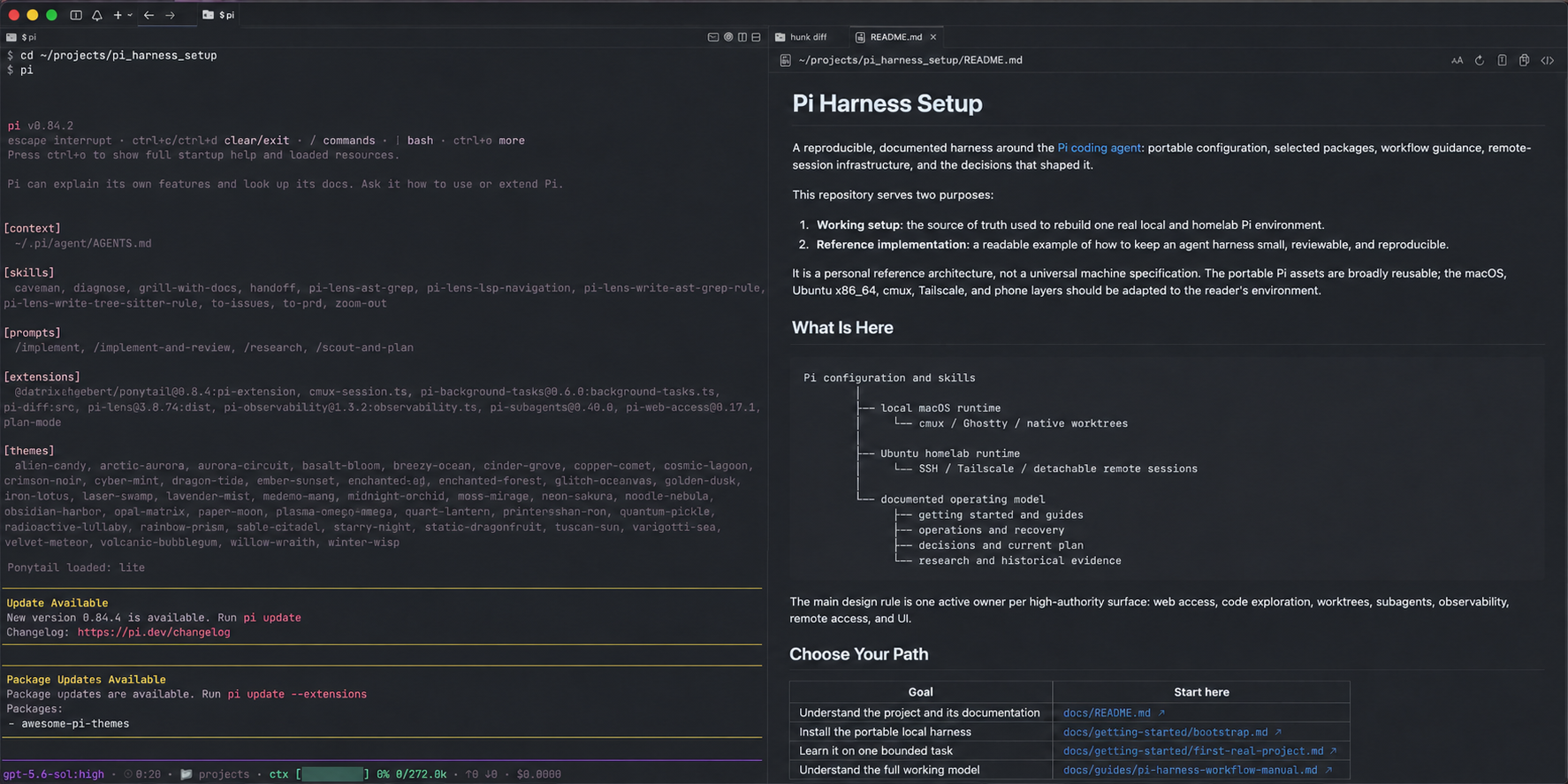
An earlier view of my desk: Pi on one side, readable project context on the other. This is a privacy-edited capture, not a screenshot of the latest versions.
2. GPU work goes to the GPU homelab
If a job needs a GPU, I send it to the homelab. eg:
- Simulation stacks, ROS
- Model training
- Neuroscience research
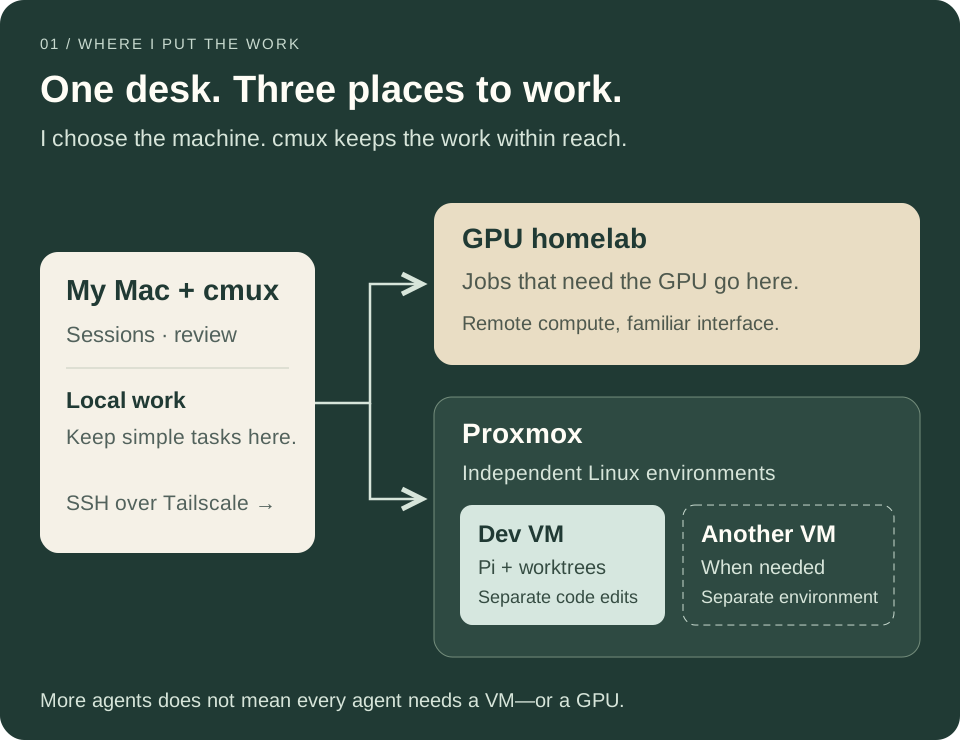
That keeps two decisions separate: where I interact with the job, and where the job gets its compute. I can stay in the same working environment while the heavier work runs elsewhere.
3. Proxmox gives the other work its own rooms
Compute isn't the only reason to go remote. Sometimes I want an agent to install dependencies, run services, or try an environment without turning an existing project into collateral damage.
Proxmox lets me carve a physical machine into separate virtual machines. Each guest can have its own Linux environment, resources, access, and lifecycle.
That's the appeal for me: I can give a task its own room, rather than asking every task to be careful in the same room.
A dashboard so I don't have to visit every room
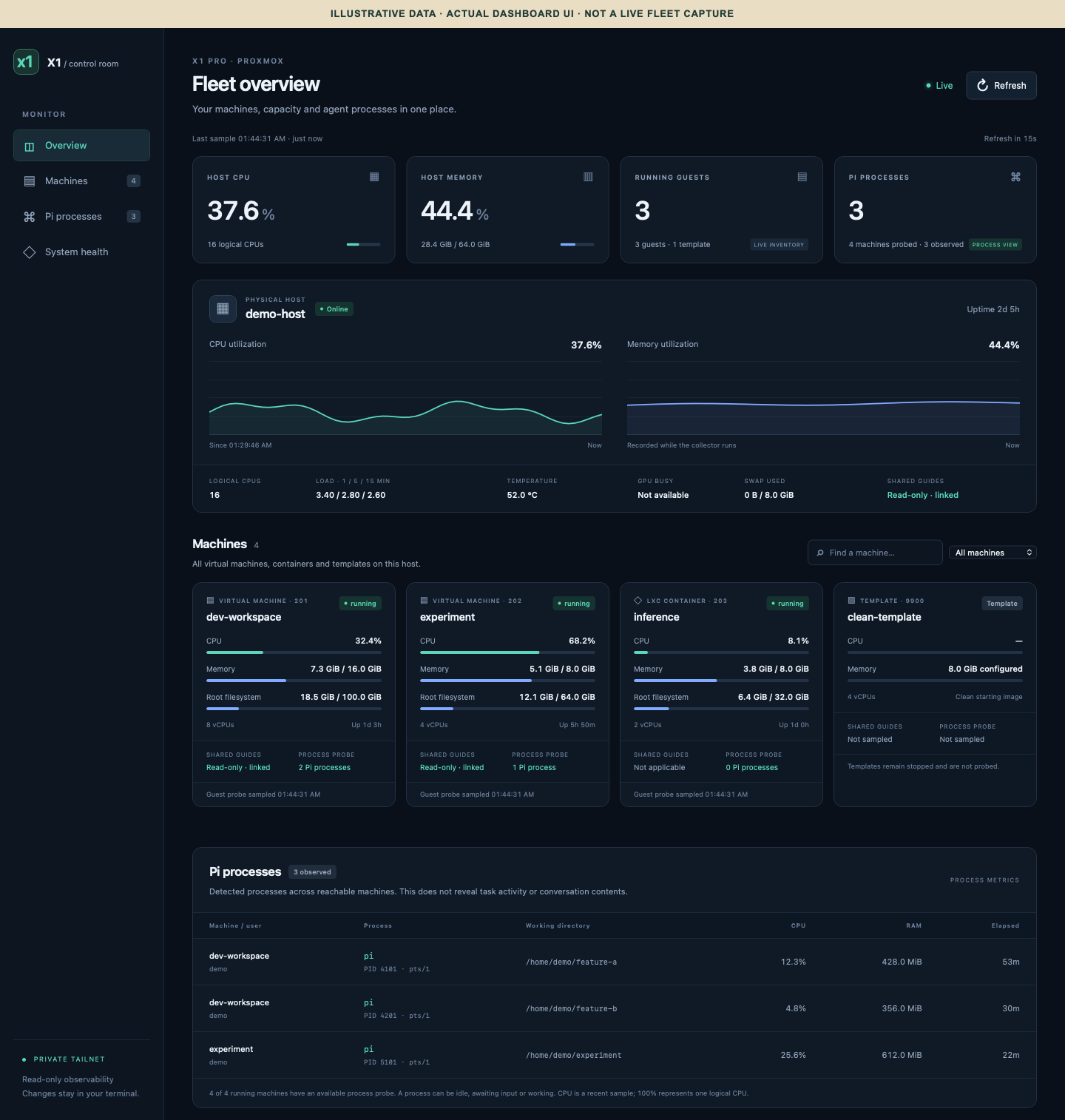
I recently added a small dashboard for the Proxmox side of this setup. Once work is spread across machines, I want to see the room before walking over to each desk.
It brings host CPU and memory, guest machines, storage, and observed Pi processes into one view. I can see which guests are running, where Pi processes exist, and what resources they're using. The collector aims for a new snapshot every fifteen seconds; old samples and unavailable probes stay visibly labelled rather than becoming reassuring zeroes.
Provisioning VMs with my agent
I ask the Pi agent on Proxmox:
Give this project its own Linux VM, my usual Pi setup, and access to these repos.
It uses the existing provisioning helpers to:
- Preview CPU, RAM, disk and repository access.
- Clone a clean template with a fresh machine identity.
- Install a recorded version of my Pi setup and wait for it to be ready.
- Enroll the VM and issue scoped access.
GitHub access
The Pi agent on Proxmox has host admin access. Coding agents stay inside their VMs.
- App signing keys: stay on Proxmox. Rotated or revoked deliberately.
- Guest tokens: one repository per token, with the approved permissions.
- Expiry: one hour. Renewal is attempted roughly every thirty minutes.
The renewal order matters:
- Verify it's still the same VM, not a reused VM number.
- Mint and record the replacement token.
- Deliver it to the guest.
- Revoke the old token.
New access first, old access revoked second. Otherwise I've automated locking my agent out.
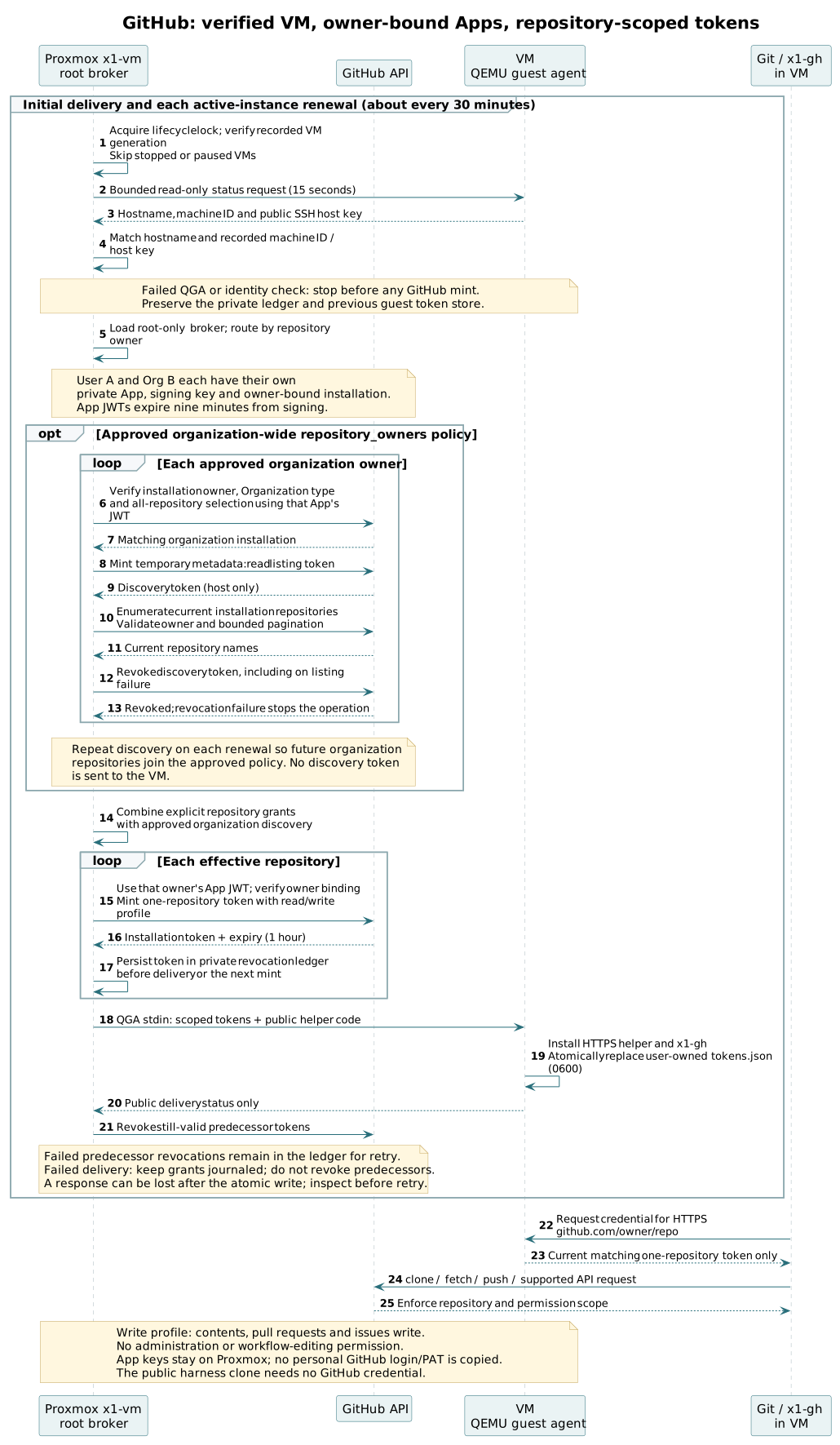
The actual sequence from my machine repo, with account names anonymized. The organization-wide discovery block is optional, not access every VM gets.
Stopped guests are skipped. Failed renewal can let GitHub access expire; it doesn't shut down the VM. Failed revocations stay recorded for retry.
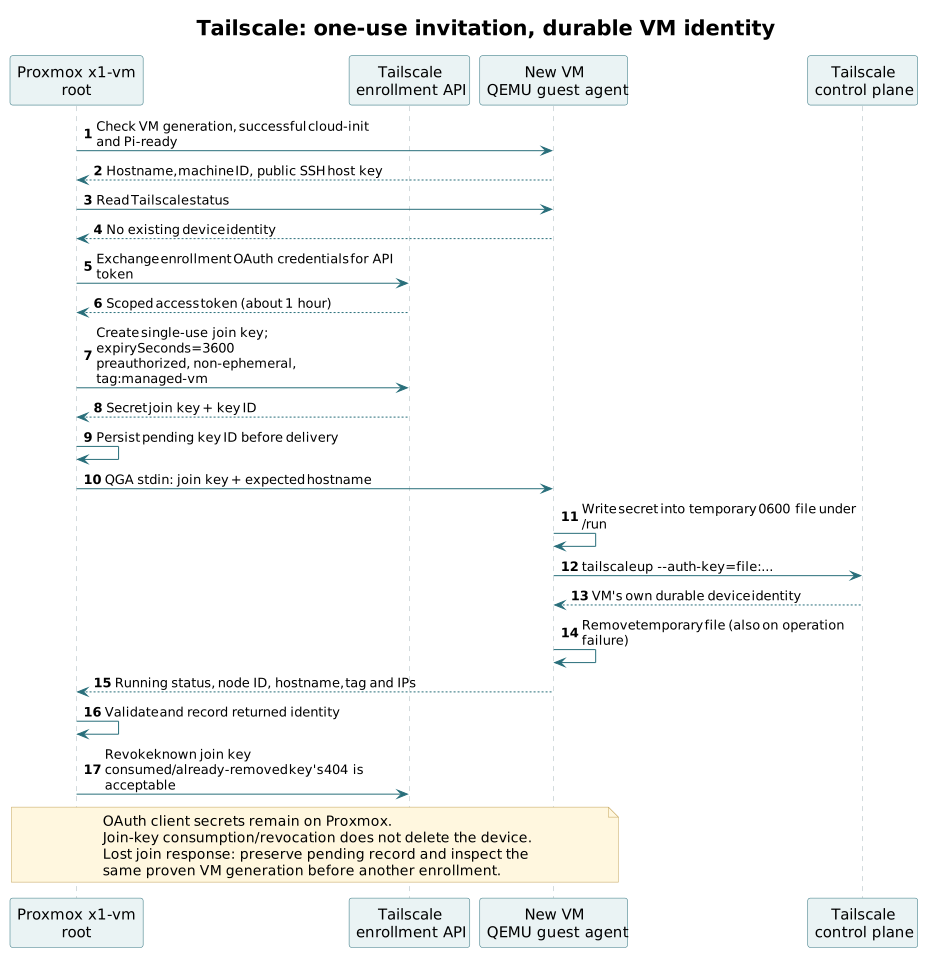
Tailscale: the invite expires, not the guest
The host keeps the network-management credentials. Each new VM gets:
- A single-use join key, requested with one-hour validity.
- Its own device identity after joining.
Using up or expiring that invitation doesn't disconnect the enrolled machine. No hourly game of “please let me back in.”
See the Tailscale enrollment sequence.
SSH: my private key stays on my Mac
- The guest gets my public login key, not my private one.
- Each VM gets fresh SSH host keys. My Mac pins the public host key obtained through the trusted Proxmox connection, then checks it when connecting.
- Pi's model-provider login is separate, per VM/account.
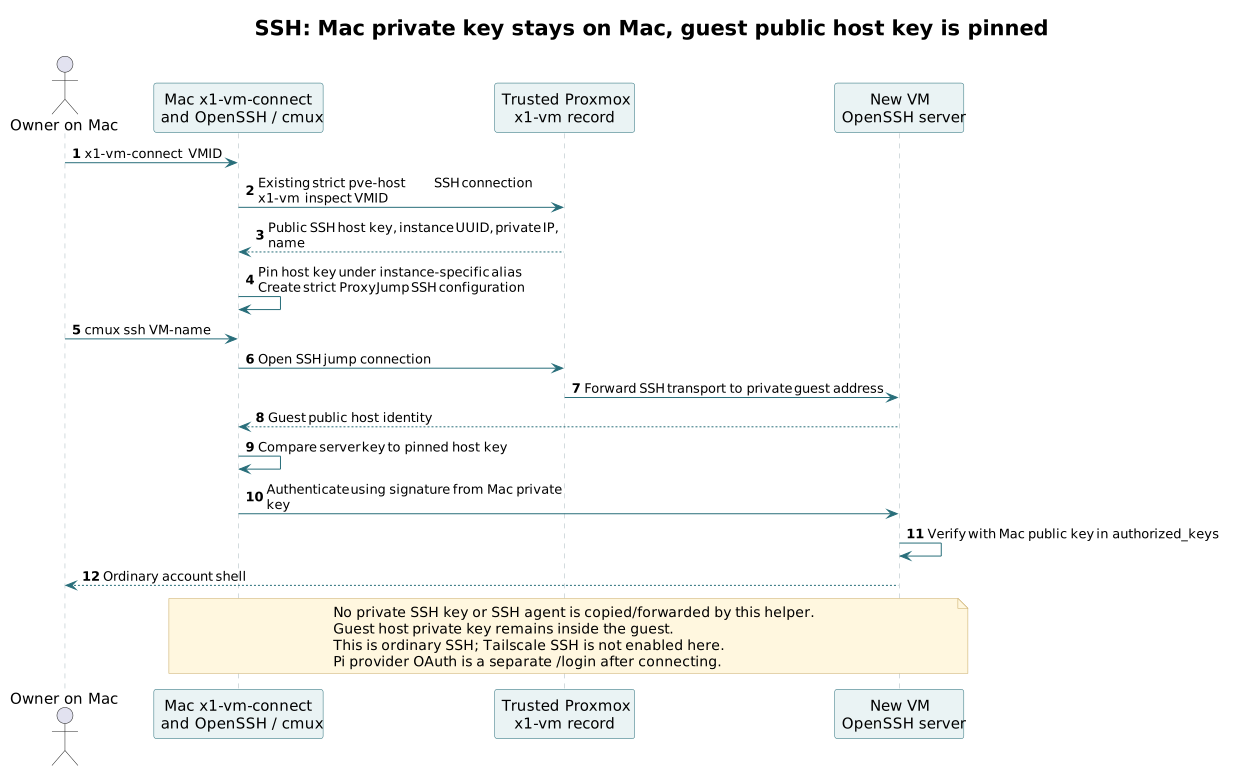
Public keys move around. My private key doesn't. Administrative alias anonymized.
Deleting a VM (the correct one, preferably)
- Verify the recorded instance and stop renewing its access.
- Revoke live GitHub tokens and remove its exact recorded Tailscale device.
- Gracefully shut down and delete that VM.
Cleanup failed? Stop and inspect. Offline isn't the same as abandoned, and the renewal timer never deletes machines.
How I keep all of this maintainable
I don't want five machines with five slightly different interpretations of my setup.
pi_harness_setup: Pi instructions, prompts, skills, packages and check/apply scripts.remote_machines: provisioning and machine operations.- My OpenClaw repo: how the different agent environments are organized.
Check for drift, then apply the managed settings. Preserve unrelated preferences. git pull isn't deployment.
I share the setup, not credentials or conversations. And Git still isn't a backup of a VM disk.
Framed, personal work, defense tech
Same habits. Different accounts and context.
Framed and personal work have documented deployments. The defense-tech foundation is still a build spec—not a third system I'm claiming is already deployed.
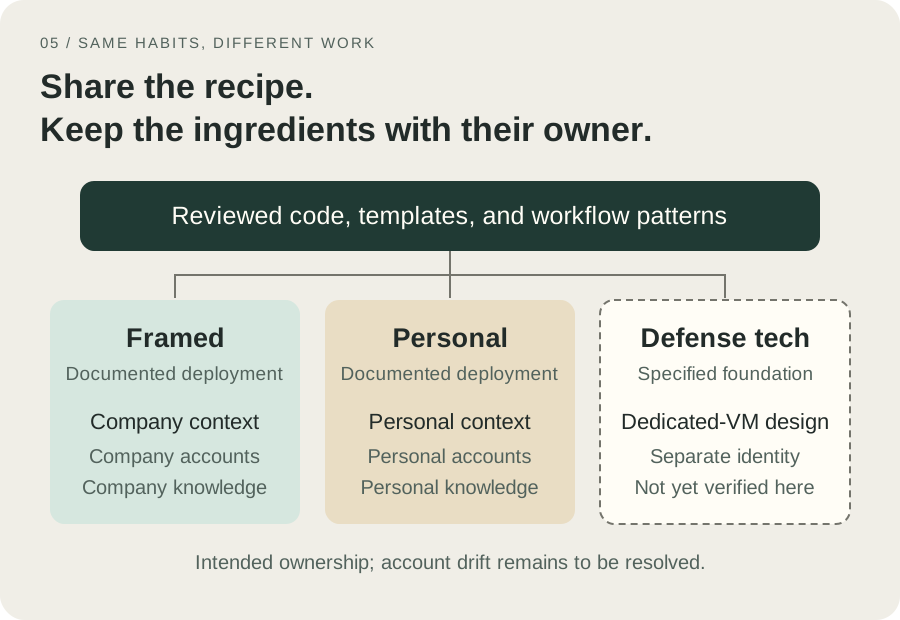
The target boundaries. Some account-ownership cleanup is still outstanding; drawing boxes doesn't enforce them.
A useful research template can travel between projects. Company knowledge shouldn't hitch a ride. Neither should a worker's confident guess become an accepted decision without review.
Less terminal babysitting
CMUX to steer. GPU machine for heavy jobs. VMs for separate environments. Dashboard to see where to look—not to declare an agent “done.”
More work in parallel. Less me playing SSH whack-a-mole.